
Most organizations rely on carrier tracking to follow a shipment from a warehouse to their front door. That works well for the first leg of the journey. But the moment a carrier marks a package as “Delivered,” that visibility disappears entirely. From that point on, nobody knows where the package is, who has it, or when it was picked up. That gap is exactly what internal package tracking software is designed to close. At TekCore, we built our package tracking software, TekTrack, specifically to take over where carriers leave off and follow every package from dock to desk with a complete, searchable chain of custody.
This guide explains what internal package tracking software is, how it differs from carrier tracking, what features matter most, and how organizations across every industry are using it to eliminate lost packages, reduce staff burden, and create the kind of accountability that paper logs and spreadsheets simply cannot provide.
What “Internal” Means in Package Tracking
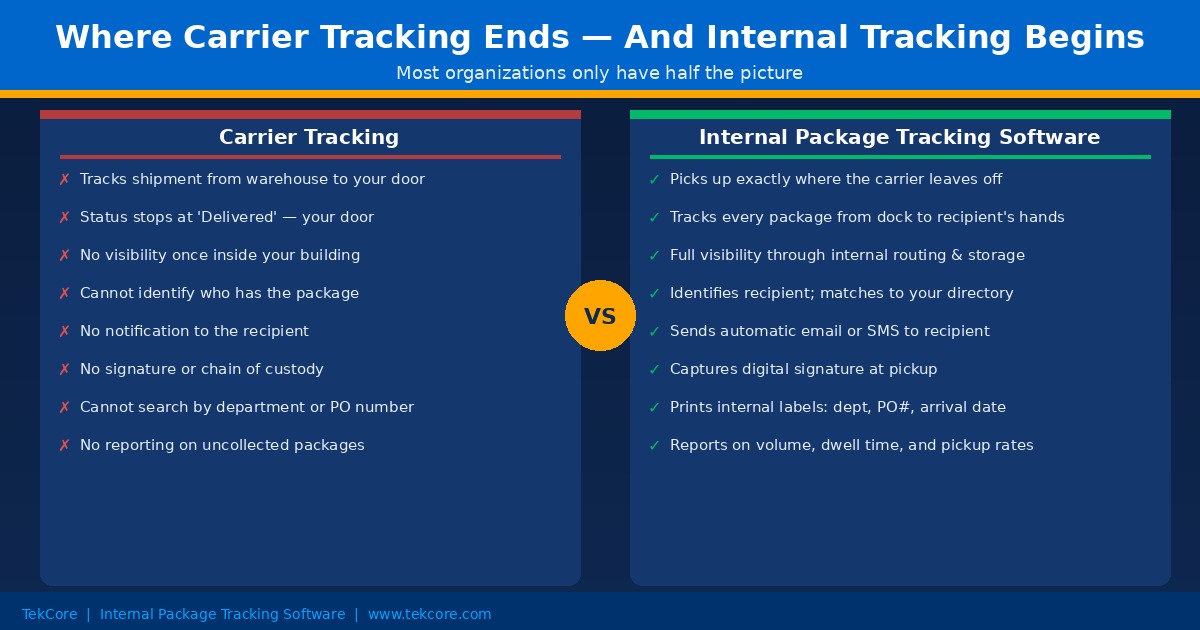
The word “internal” distinguishes this category of software from carrier-facing tracking tools. Carrier tracking platforms, whether offered by UPS, FedEx, USPS, or Amazon, are designed to give shippers and customers visibility into a shipment as it moves through the carrier’s own network. That visibility ends the moment the package crosses the threshold of your building.
Internal package tracking software picks up from that exact moment. It manages the entire journey of a package inside your organization: from intake at the loading dock or mailroom, through internal routing and storage, to the final moment when the intended recipient signs for it and takes it away. Every step is logged digitally, every notification is sent automatically, and every record is stored and searchable indefinitely.
Think of it this way. A carrier tells you a package arrived at your building. Internal package tracking software tells you which staff member received it, when it was scanned, where it is stored, which recipient was notified, and exactly when and by whom it was picked up. That is a fundamentally different level of accountability.
Why the Gap Between Carrier and Internal Tracking Matters
The practical consequences of this gap show up every day in organizations that have not yet implemented internal tracking. A recipient receives a carrier notification saying their package was delivered. They go to collect it and it is nowhere to be found. The carrier’s record says “Delivered.” Nobody on staff can locate it. What follows is a time-consuming investigation that usually ends with a lost package claim, a replacement order, and a frustrated employee.
This scenario is not rare. It is a predictable outcome of relying on manual processes to bridge the gap that carrier tracking leaves open. Paper logs get wet, smudged, or lost. Spreadsheets require someone to type accurately under pressure. Sticky notes fall off shelves. None of these methods create the kind of reliable record that resolves disputes quickly or holds anyone accountable.
The organizations that eliminate this problem are the ones that treat the internal delivery journey as seriously as they treat the carrier delivery journey. They use inbound package tracking software to create a digital record the moment a package enters their facility, and they maintain that record all the way through to pickup. The result is a system where any package can be located in seconds, any dispute can be resolved with evidence, and any pattern of delay or loss can be identified and corrected.
How Internal Package Tracking Software Works
The core workflow is straightforward enough that most staff can learn it in under an hour, and powerful enough to handle hundreds of packages per day without slowing down.
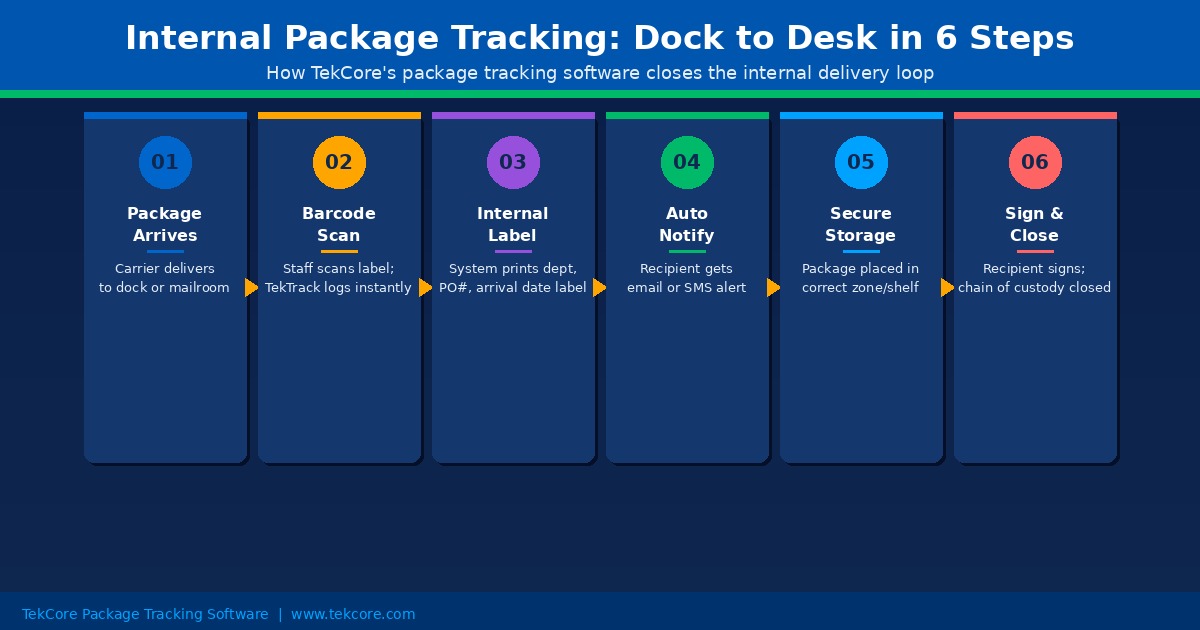
When a package arrives, a staff member opens the mailroom management software on a phone, tablet, or desktop workstation and scans the barcode on the carrier label. The software reads the tracking number automatically and matches it to the intended recipient using your organization’s directory. No manual typing is required. The arrival timestamp, carrier, and recipient details are stored instantly in a searchable database.
Immediately after the scan, the system sends an automated notification to the recipient via email, SMS, or both. The recipient knows their package has arrived, where to pick it up, and any special instructions before they ever have to ask.
An optional but highly practical step at this point is internal label printing. TekTrack can print a new label for the package at intake that displays the recipient’s department, the date of arrival, and the purchase order number if applicable. That label goes on the package before it reaches the shelf, so staff do not need to interpret a carrier shipping label to route it correctly. For organizations that tie deliveries to cost centers or procurement records, this feature creates a direct link between the physical package and the corresponding financial record.
When the recipient arrives to collect their package, they sign digitally in the app. Their name, the timestamp, and their signature are stored alongside the original intake record. The chain of custody is now complete and permanently closed.
Who Benefits Most From Internal Package Tracking
Internal package tracking software adds value in any environment where packages arrive regularly and accountability matters. The organizations that gain the most tend to share a few characteristics: high daily delivery volume, staff who divide their time between packages and other responsibilities, and recipients who expect timely, reliable service.
- Corporate offices. Employees receive business equipment, sensitive documents, personal orders, and procurement shipments at work. Without a system, reception and mailroom staff spend significant time managing deliveries manually while recipients grow frustrated waiting for notifications that never come.
- Universities and colleges. Campus mailrooms handle hundreds of student packages daily, particularly during peak periods around move-in, the holidays, and the start of each semester. Manual tracking breaks down under this volume; digital tracking scales effortlessly.
- Healthcare facilities. Hospitals and medical centers receive medical supplies, lab specimens, pharmaceutical shipments, and regulated materials that require strict chain-of-custody documentation. A digital record that logs every package movement and captures signatures at each handoff is not just convenient; it is essential for regulatory compliance.
- Government and military installations. Security requirements demand that every package entering a secure facility is logged, assigned, tracked, and signed for. Paper-based systems cannot reliably meet this standard at scale.
- Apartment communities and residential properties. Property managers are responsible for packages belonging to residents they may not always be able to reach immediately. An automated notification system and digital pickup log protects the property from liability and improves resident satisfaction.
- Law firms and financial institutions. Time-sensitive legal documents, contracts, and financial materials require a verifiable record of when they arrived, who received them, and when they were picked up. Internal package logging software provides that record automatically.
Eight Features That Separate Good Systems From Great Ones
Not every internal package tracking platform is built to the same standard. When evaluating options, these are the capabilities that make a meaningful difference in daily operations.
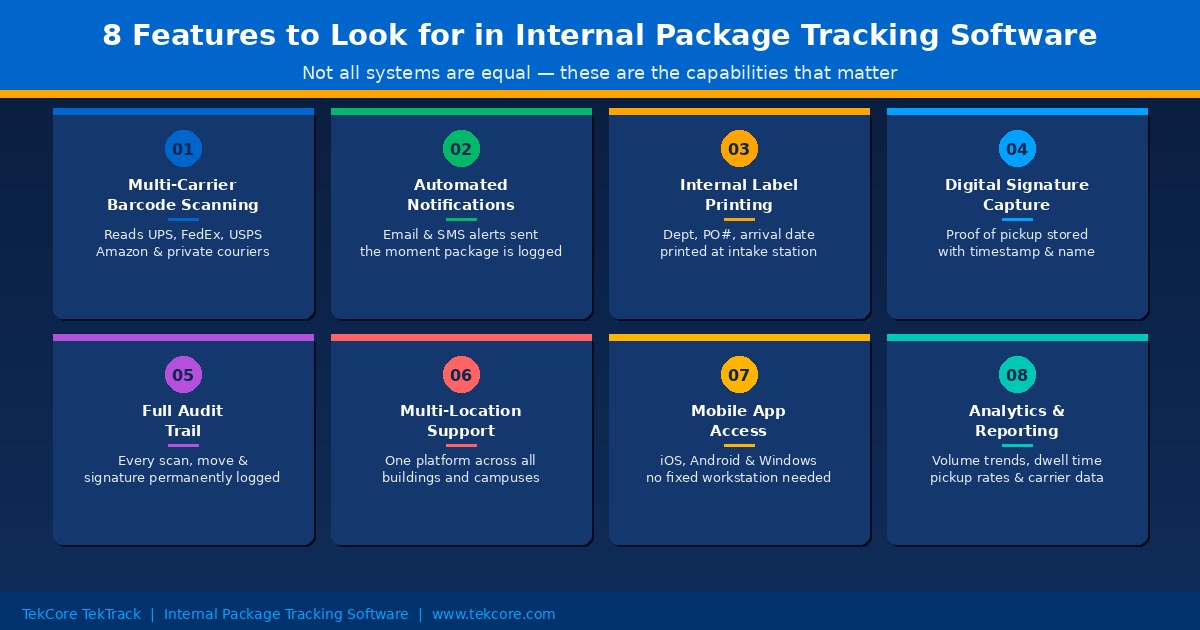
- Multi-carrier barcode support. Your system should recognize labels from all major carriers including UPS, FedEx, USPS, Amazon, and private couriers without requiring manual entry for any of them. If staff have to type tracking numbers by hand for certain carriers, the system is already creating bottlenecks.
- Automated recipient notifications. The notification should go out the moment the package is scanned, not when someone remembers to send it. Configurable templates and channel options (email, SMS, or both) ensure the right message reaches the right person immediately.
- Internal label printing. The ability to print a new label at intake showing the recipient’s department, purchase order number, and date of arrival transforms internal routing. Staff can place packages in the correct zone without interpreting carrier labels, and procurement teams gain a physical link between shipments and their corresponding records.
- Digital signature capture. Proof of pickup should include the recipient’s name, a digital signature, and an automatic timestamp. This record closes the chain of custody and eliminates the single most common source of package disputes: “I never received it.”
- Complete audit trail. Every scan, every move, every notification, and every signature should be stored permanently and be searchable by tracking number, recipient name, carrier, date range, or department. A system that only shows current status is not sufficient for organizations with compliance requirements.
- Multi-location support. Organizations managing more than one building, floor, or campus need a single parcel tracking software platform that handles all locations from one interface. Separate systems for separate locations create reporting gaps and training burdens.
- Mobile and cross-platform access. Staff should be able to process packages at any entry point, not just at a fixed workstation. A system that works on iOS, Android, and Windows gives your team the flexibility to log packages where deliveries actually happen.
- Analytics and reporting. Volume trends, average pickup times, carrier activity, dwell time by recipient or department, and outstanding package reports give operations managers the data they need to schedule staff efficiently and identify recurring issues before they become chronic problems.
Internal Package Tracking vs Spreadsheets: A Direct Comparison
Many organizations still manage inbound packages using a shared spreadsheet. It is free, familiar, and seems adequate until volume increases or a dispute arises. Here is what the comparison actually looks like in practice.
A spreadsheet requires someone to open it, find the right row, type the tracking number accurately, enter the recipient name correctly, save the file, and then separately send a notification email. If any of those steps is skipped, done incorrectly, or delayed, the record is incomplete. When a recipient asks where their package is, staff have to open the spreadsheet, search manually, and hope the entry is accurate enough to find the right row. When a dispute arises about whether a package was picked up, there is no signature, no timestamp, and no photograph to rely on.
Internal package tracking software replaces every one of those manual steps with a single barcode scan. The record is created instantly and accurately. The notification goes out automatically. The signature is captured digitally at pickup. The audit trail is complete and tamper-proof. The time saved is not marginal; organizations that switch from spreadsheets to digital mailroom software routinely report reductions of 70 percent or more in the time spent processing each package.
What to Look for When Choosing Internal Package Tracking Software
The practical questions to answer before selecting a system come down to four areas.
First, ease of deployment. The best internal package tracking systems do not require IT involvement to set up. If your team needs a developer to configure the software or integrate it with existing systems before anyone can scan a package, the barrier to adoption is already too high. Look for a system that a mailroom manager can configure and launch in a single day.
Second, device flexibility. Your team may work across phones, tablets, and desktop workstations depending on the layout of your receiving area. A system that requires specific hardware or runs only on one operating system will create friction. Cross-platform support is not a luxury; it is a baseline requirement for practical deployment.
Third, scalability. A small office processing 20 packages per day has different needs than a university mailroom processing 500. Make sure the system you choose can handle your peak volume without slowing down, and that it supports multiple concurrent users if more than one person will be logging packages at the same time.
Fourth, support and reliability. Internal package tracking is an operational dependency. When the system is down, packages pile up and recipients do not get notified. Choose a provider that offers responsive support and a track record of system reliability. A free or low-cost tool that goes offline regularly is not actually cheaper than a paid system that works every day.
How TekCore Delivers on All of These Requirements
TekCore’s package tracking software, TekTrack, was built from the ground up for organizations that need a reliable, scalable, and easy-to-use internal package tracking solution.
TekTrack supports multi-carrier barcode scanning with SmartScan technology that reads standard and damaged labels accurately. Automated notifications go out via email and SMS the moment a package is logged. Internal label printing with department, PO number, and arrival date is available as a standard feature. Digital signatures are captured at pickup and stored with every delivery record. The complete audit trail is fully searchable from any device and exportable for compliance reporting.
The system works on Windows, iOS, and Android, so your team can process packages wherever deliveries happen. It supports multiple concurrent users and multiple locations, making it equally suited to a single corporate mailroom and a multi-building campus operation. And because TekTrack does not require IT support to deploy or maintain, most organizations are up and running within a day of deciding to move forward.
We work with corporate offices, universities, healthcare facilities, government agencies, apartment communities, and dozens of other organization types. Across all of them, the outcome is consistent: fewer lost packages, faster pickup times, and a complete end to the guesswork that manual logging creates.
Frequently Asked Questions About Internal Package Tracking Software
Does internal package tracking software work with all carriers?
Yes, any system worth deploying should recognize barcodes from all major carriers including UPS, FedEx, USPS, DHL, Amazon, and private couriers. TekTrack uses SmartScan technology to read standard, damaged, and non-standard barcodes across all carriers without requiring manual entry.
Can it track packages that arrive without a barcode?
Yes. TekTrack allows staff to create a manual entry for packages that arrive without a readable barcode and to print an internal label for tracking purposes. No package falls through the cracks simply because it arrived without a standard carrier label.
How long does it take for staff to learn the system?
Most staff can complete the basic intake workflow in under an hour of hands-on practice. The interface is designed to be self-explanatory, which means new team members can begin processing packages on their first day without extended training.
What happens if the internet connection goes down?
TekTrack supports offline scanning. Staff can continue processing packages during a connection outage, and all records sync automatically when connectivity is restored. Your mailroom does not need to stop because the internet does.
Is it suitable for a small organization with low package volume?
Yes. Internal package tracking software is not just for high-volume operations. Even an organization that receives 20 packages per day benefits from automated notifications, digital signatures, and a searchable delivery history. The time saved and disputes prevented justify the investment at almost any volume.
Ready to Close the Gap in Your Package Tracking?
If your organization relies on carrier notifications, paper logs, or spreadsheets to manage inbound packages, you are operating with half the picture. The part you are missing, the internal journey from dock to desk, is exactly where most lost packages, missed notifications, and accountability gaps occur.
TekCore’s internal package tracking software gives your team a complete, reliable solution that works from the moment a carrier delivers to the moment a recipient signs. Visit our package tracking software page to learn more about TekTrack, or reach out to our team to discuss your specific operation. Most organizations are up and running faster than they expect.
