

How to Evaluate Package Tracking Software Before You Buy: A Buyer’s Checklist for Facilities Managers
Evaluating package tracking software means comparing vendors against a written checklist that covers your actual intake volume and workflow, core features like scanning and notifications, integration with the systems you already run, total cost of ownership, and how each vendor performs during a real trial, not just a sales demo. Facilities and mailroom managers who skip a structured evaluation and buy on price or a single feature they liked in a demo often end up replacing the software again within two years, once the gaps show up in daily use.
Why Buying Package Tracking Software Is a Bigger Decision Than It Looks
A package tracking purchase can feel like a small operational tool decision, but it rarely stays that small once other departments get involved. According to Gartner, a typical B2B purchase decision today involves an average of six to ten stakeholders, up from about 5.4 a decade ago, and a mailroom software purchase is a good example of why. IT wants to know about data security and integration. Finance wants total cost of ownership, not just the license fee. HR or security may care about chain of custody for sensitive deliveries. Property management or building operations wants to know how it affects tenant or resident experience.
Consider a facilities manager at a mid-size corporate campus who assumes buying package tracking software is her decision alone, only to have IT block the rollout two weeks before launch because nobody checked whether the platform could integrate with the company’s single sign-on system. A written checklist used from the start, one that flags which stakeholders need to weigh in on which criteria, prevents that kind of late-stage surprise and shortens the overall buying cycle instead of lengthening it.
Start With the Problem, Not the Feature List
Before comparing vendors, write down the specific problems the current process creates. Is the issue theft and misdelivery, staff time spent on manual logging, a lack of proof of delivery when disputes come up, or simply not being able to scale during peak periods without adding headcount? Different platforms are built with different priorities, and a feature list that looks impressive on a website does not tell you whether it solves your specific problem.
A useful exercise is tracking a single week of the current process in detail: how many packages arrive, how long intake takes per package, how many phone calls or walk-up questions staff field about package status, and how many times a package cannot be located when someone asks for it. Those numbers become the baseline you use later to measure whether a new system actually delivered the improvement a vendor promised, rather than relying on the vendor’s own case studies.
Core Features Every Package Tracking Platform Should Have
Once the problem is clear, compare vendors against a consistent list of core capabilities rather than letting each demo set its own agenda. At minimum, evaluate each platform on the following.
- Barcode and label scanning at intake. Fast, accurate scanning should be the default way packages get logged, not an optional add-on.
- Automated recipient notifications. The system should notify the recipient by email or text the moment a package is scanned in, without staff having to trigger it manually.
- Digital signature or photo capture at pickup. Proof of delivery needs to be stored automatically and be easy to pull up later if a dispute comes up.
- Search and reporting. Staff should be able to find any package by recipient name, tracking number, or date in seconds, and managers should be able to pull volume and turnaround reports without help from IT.
- Mobile or handheld scanning support. Anyone covering a loading dock, a large campus, or multiple buildings needs to scan where the package actually is.
Score each vendor against this list using the same scale, so the comparison is based on evidence rather than which sales rep gave the more polished presentation.
Integration With the Systems You Already Run
Package tracking software rarely operates in isolation. It typically needs to work alongside a property management system, a visitor management platform, an employee directory or single sign-on service, or in a university or hospital setting, a student information system or patient record system. A platform that cannot pull recipient names and contact information from an existing directory forces staff to maintain a second, parallel list of names, which becomes outdated and creates the exact kind of misdelivery risk the software was supposed to fix.
Ask each vendor for a specific answer, not a general one, about how their platform connects to the systems your organization already depends on. A university mailroom manager evaluating package tracking software should ask whether student housing assignments sync automatically each semester, for example, rather than assuming any platform labeled for education will handle it. Vague answers like “we can build a custom integration” usually mean additional cost and a longer implementation timeline that will not show up until the contract is already signed.
Evaluating Vendors Beyond the Demo
A sales demo is designed to show a vendor’s best-case scenario, so it should be one input into a decision, not the deciding factor. Ask for references from organizations of a similar size and type to yours, and ask those references specific questions: how long did implementation actually take compared to what was promised, how responsive is support when something breaks, and would they buy the same product again today. A vendor confident in its product will not hesitate to connect you with current customers.
It is also worth understanding what makes a vendor’s approach different from competitors serving the same type of facility, since two platforms that look similar in a demo can differ significantly in how they handle edge cases like oversized freight, multi-tenant buildings, or chain of custody documentation. Reviewing a resource like TekCore’s comparison of what sets its platform apart before a call with any vendor gives you sharper questions to ask, rather than accepting a generic pitch at face value.
Understanding Total Cost of Ownership, Not Just the Sticker Price
The quoted license or subscription fee is rarely the full cost of a package tracking platform. Ask each vendor to itemize implementation fees, training costs, hardware such as scanners or label printers, ongoing support tiers, and any charges for adding locations or users later. A platform that looks like the cheaper option at first can end up costing more once a facility adds a second building or a busier season pushes it into a higher usage tier.
If your organization requires a formal request for proposal for purchases above a certain dollar threshold, budget real time for that process. Loopio’s seventh annual RFP Response Trends and Benchmarks Report, based on data from more than 1,500 proposal teams, found that vendors now spend an average of 33 hours preparing a single RFP response and that buying organizations issuing RFPs average 166 of them a year across all purchase types. That volume is exactly why a detailed, resource-backed proposal, such as TekCore’s package tracking white paper, can shortcut a lengthy back and forth by answering common evaluation questions up front.

Running a Trial That Actually Tests What Matters
Most reputable vendors offer a trial period, but a trial only produces useful information if it is structured around your real workflow instead of a generic walkthrough. Run the trial during a normal, not artificially quiet, stretch of package volume, and involve the actual staff who will use the system daily, not just a manager clicking through the interface once. Have staff scan real packages, trigger real notifications, and practice pulling up proof of delivery for a package that was picked up a week earlier.
Before starting a trial, review the vendor’s editions and features breakdown so you know exactly which tier you are testing and whether the trial reflects the plan you would actually purchase. A trial run on a higher tier than your budget allows will give you an inflated sense of what the software can do for the price you will actually pay.
Red Flags That Should Slow Down a Decision
Certain patterns during the evaluation process are worth treating as warning signs rather than minor annoyances. A vendor that cannot provide current customer references, that gives vague or shifting answers about integration capability, or that pressures you to sign before a trial period ends is telling you something about how the relationship will go after the contract is signed. Similarly, be cautious of a platform priced well below every competitor with no clear explanation, since that gap is often made up later through hardware costs, support fees, or a thinner feature set than the sales pitch suggested.
A facilities manager who ignored a vendor’s repeated delays in scheduling a technical integration call, then signed anyway to meet an internal deadline, later spent three months after go-live waiting on that same integration work while running a manual backup process in parallel. The delay that showed up during evaluation was not a fluke; it was a preview of the support experience after the contract was signed.
Common Pricing Models and What They Mean for Your Budget
Package tracking vendors typically price their platforms one of a few ways: a flat monthly fee regardless of volume, a per-package or per-scan fee, or a tiered plan based on the number of locations or users. Each model rewards a different kind of operation. A facility with steady, predictable volume often does better on a flat fee, while a seasonal operation, such as a university mailroom that is quiet in summer and overwhelmed during move-in week, may prefer a model that flexes with actual usage instead of paying a peak-season rate all year.
Ask directly what happens when volume exceeds the plan you are quoted. Some vendors automatically bump a facility to the next tier and bill retroactively for the month, which can produce an unpleasant surprise on an invoice during a busy holiday season. Getting that answer in writing before signing avoids a dispute over an invoice later, when your negotiating leverage is lower than it is during the evaluation stage.
Building the Final Comparison
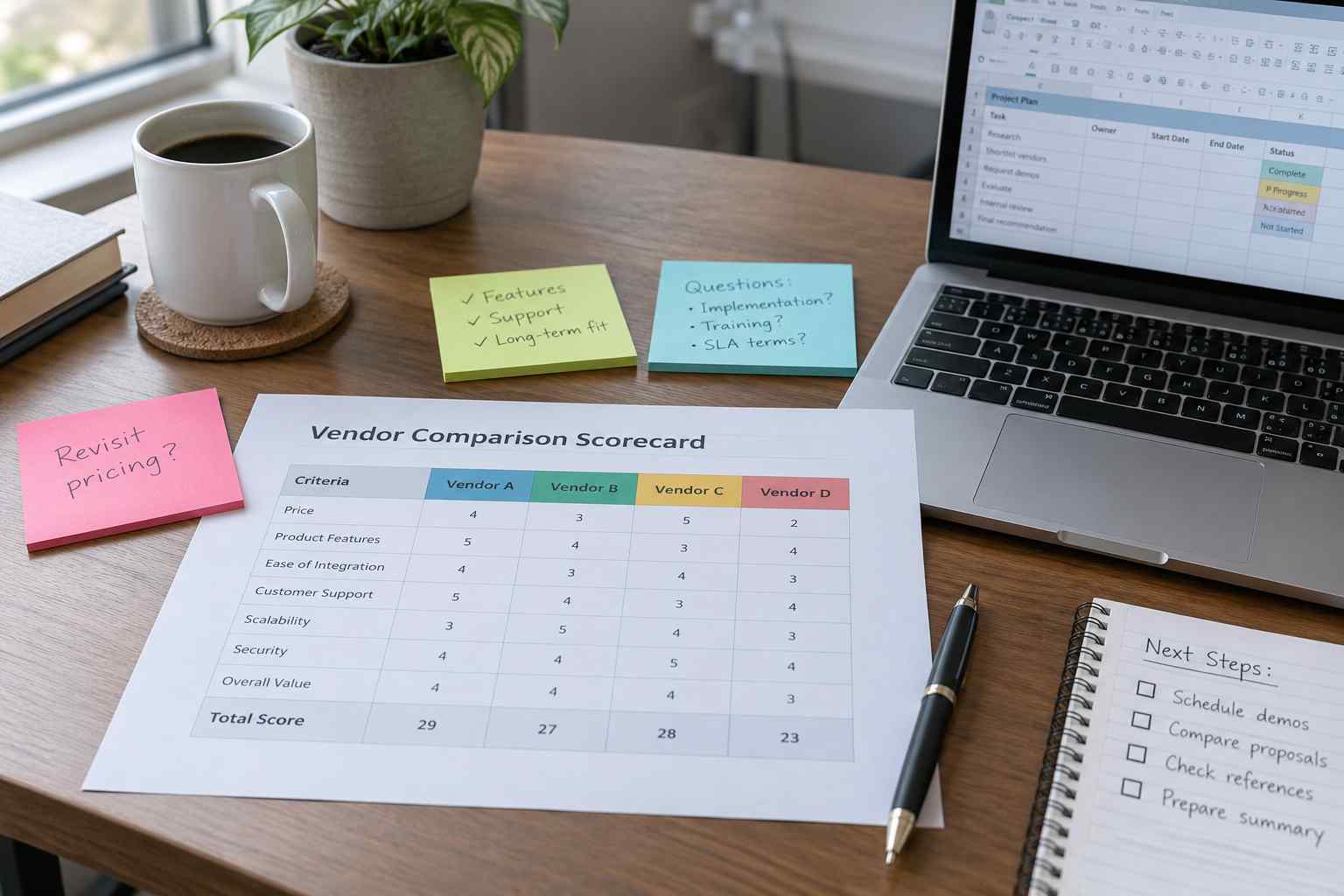
Once trials are complete and references have been checked, put every vendor side by side on one sheet using the same categories: core features, integration, total cost of ownership, pricing model, trial performance, and reference feedback. Weight the categories based on what matters most to your operation; a hospital receiving pharmacy deliveries will weight chain of custody documentation more heavily than a coworking space will, for example. A structured comparison like this also gives you a clear record to share with the stakeholders identified at the start of the process, which speeds up final approval instead of restarting the discussion from scratch.
Keep the completed comparison on file even after you choose a vendor. If the platform underperforms against what was promised during evaluation, having a written record of the original claims and your scoring makes it far easier to hold the vendor accountable, whether that means escalating a support issue or deciding not to renew when the contract term ends.
Frequently Asked Questions
How long should a package tracking software evaluation take.
Most organizations can complete a thorough evaluation, including a real trial period, in four to eight weeks. Rushing it to a few days usually means skipping the trial step that reveals the most useful information.
Should we involve IT in the evaluation even for a small mailroom purchase.
Yes. Even a small purchase can require IT time later if the platform needs network access, single sign-on integration, or a data security review, so involving them early avoids delays after a contract is signed.
What is the biggest mistake facilities managers make when choosing package tracking software.
Choosing based on the demo alone rather than a real trial with actual staff and real package volume. A polished demo does not reveal how a system performs during a busy Monday morning or a delivery surge.
Is the cheapest option ever the right choice.
Sometimes, but only after confirming total cost of ownership, not just the sticker price. A low upfront cost that turns into expensive add-ons for hardware, users, or locations can end up costing more over a multi-year contract.
If you are ready to see how a purpose-built platform holds up against your checklist, start a trial with TekCore and test it against your own package volume and workflow before you decide.
