
How Package Tracking Software Integrates With Smart Lockers for Self-Service Pickup
Package tracking software integrates with smart lockers by automatically assigning an incoming package to an available locker compartment at intake, sending the recipient a notification with a pickup code, and logging the exact moment the locker is opened as proof of delivery. This combination removes front desk staff from the pickup process entirely for most packages, letting recipients retrieve their own deliveries at any hour without anyone else needing to be present.
Why Facilities Are Turning to Self-Service Locker Pickup
Package volume has grown steadily for years across corporate offices, apartment communities, universities, and coworking spaces, and front desk or mailroom staff are frequently the bottleneck in getting packages into recipients’ hands quickly. Every manual handoff, a staff member locating a package on a shelf, checking an ID, and logging the pickup by hand, adds time and creates a queue during busy periods. Smart lockers remove that manual step for the majority of standard packages, letting recipients pick up on their own schedule rather than during staffed hours only.
This matters most in facilities with high package volume relative to staff size. A university mailroom serving several thousand students, or a corporate campus with hundreds of employees, can see dozens or hundreds of packages arrive on a single day. Without lockers, all of that volume funnels through a single staffed window. With lockers integrated into the tracking software, only exceptions, oversized items, items requiring signature verification, or packages that do not fit any available compartment, need direct staff handling.
How the Integration Actually Works From Intake to Pickup
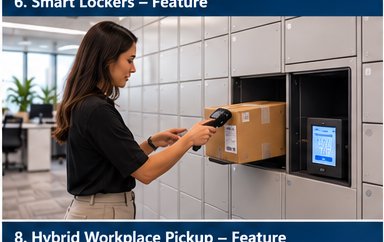
The process typically starts the same way any tracked package intake does: a staff member or automated scanning station reads the barcode on an incoming package, which logs it into the tracking software along with the recipient’s name or unit information. From there, integrated locker systems take over the next step automatically. The software checks locker availability in real time, assigns the package to an open compartment sized appropriately for it, and physically or electronically directs the locker system to reserve that compartment.
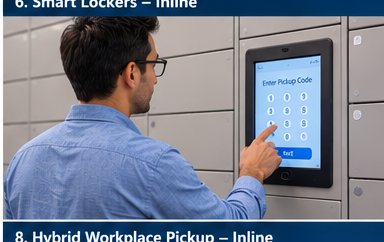
Once the package is placed inside and the locker door closes, the software immediately sends a notification to the recipient, typically by text message, email, or app push notification, containing a unique pickup code or QR code tied specifically to that package and that locker. When the recipient arrives, they enter the code or scan it at the locker bank, the correct compartment door unlocks automatically, and the software logs the exact date and time of pickup as a permanent proof-of-delivery record.
What Happens When a Package Does Not Fit or a Locker Is Unavailable
No locker system has unlimited capacity, so integrated tracking software needs a clear fallback path for oversized items or moments when every appropriately sized compartment is already occupied. In a well-designed system, staff receive an automatic alert when this happens, flagging the package for manual storage and manual notification instead. The recipient still gets a notification that their package has arrived, but it directs them to the staffed pickup location rather than a locker bank. This prevents packages from being lost in the gap between an automated system and a manual process, since the tracking record follows the package regardless of which pickup method ends up being used.
Security and Chain of Custody Benefits
Smart lockers integrated with tracking software create a stronger chain of custody record than a shelf-based pickup system typically allows. Every step, intake scan, locker assignment, notification sent, and pickup confirmation, is timestamped and stored automatically, without relying on a staff member remembering to log a manual handoff correctly. If a recipient later disputes ever receiving a package, the software can produce the exact time the locker was opened and, in many systems, whether the access code used matched the one issued to that specific recipient.
This audit trail also reduces a common source of package theft and misdelivery: packages sitting out in the open on a shelf or table where anyone passing by could take the wrong one, or the right one, without authorization. A locked compartment that only opens for the correct code closes off that opportunity almost entirely.
What to Look for When Evaluating Locker-Integrated Tracking Software
Not every package tracking platform integrates with every locker hardware brand, so facilities evaluating a locker rollout should confirm compatibility with their preferred locker manufacturer before committing to either piece of the system. It is also worth asking specifically how the software handles oversized-item fallback, whether notifications support both text and email for recipients with different preferences, and whether the pickup log data is exportable for audit or compliance purposes.
Facilities with fluctuating package volume, such as universities with seasonal move-in surges or retail-adjacent office buildings during holiday shopping periods, should also ask how the software and locker system handle temporary overflow, since even a well-sized locker bank can be overwhelmed during a known peak period without a clear manual overflow process built in.
Getting Started
Facilities considering a locker rollout do not need to convert their entire mailroom at once. Many successful implementations start with a single locker bank covering standard-sized packages, while oversized or sensitive items continue through the existing staffed process, giving the facility a chance to measure actual pickup speed improvements and staff time savings before expanding further.
Learn more about how digital mailroom software can support a locker rollout, or see how the broader system handles intake, notifications, and chain of custody with how package tracking software works. Ready to see it in action for your facility? Schedule a demo.
