
How Package Tracking Analytics Give Facilities Managers Proof of Mailroom Performance
Most facilities managers can tell you, in general terms, whether their mailroom is running smoothly. Far fewer can prove it with numbers when a director, a tenant, or a budget committee asks. Package tracking software closes that gap by turning everyday intake and pickup scans into structured performance data, giving facilities managers the same kind of measurable proof for their mailroom that other building systems already provide for energy use, work orders, or occupancy.
This matters because mailroom operations are judged by the same standards as every other line item in a facilities budget, even though they have historically been one of the hardest areas to measure. A logbook can tell you that a package arrived. It cannot tell you how long it sat before pickup, which staff member handled it, or whether intake times are trending up as delivery volume grows. Analytics built into package tracking software answer exactly those questions, and that answer is what turns a mailroom from a cost center nobody can evaluate into an operation with a track record.
Why Manual Mailroom Tracking Cannot Produce Real Metrics
A paper logbook or a basic spreadsheet can record that something happened, but it was never designed to answer questions about patterns over time. Pulling a real metric, such as average time from intake to pickup over the last quarter, from a stack of sign-in sheets means someone manually reading and tallying entries by hand, which is slow enough that most facilities teams simply never do it. The result is that mailroom performance gets discussed anecdotally, based on whoever remembers the last complaint, rather than measured consistently.
This is not a small inefficiency. Manual package processing commonly takes ten minutes or more per item when every step, from logging to notifying to confirming pickup, is done by hand, and that per-package time is exactly the kind of number a spreadsheet was never going to surface on its own, since nobody is timing each transaction with a stopwatch (see UPS's own guidance on how tracking status data is generated for a sense of how much structured event data a single package scan produces).
What Package Tracking Analytics Actually Measure
Software-based package tracking generates a timestamped event for every step a package goes through: intake scan, notification sent, and pickup confirmation, at minimum, with many systems also logging which staff member handled each step. That raw event data is what powers the metrics facilities managers actually need to report on.
Average dwell time. The time between a package being scanned in and being picked up, tracked as an average and as a trend over weeks or months, is one of the clearest signals of whether a mailroom is keeping pace with demand.
Processing time per package. The time from arrival scan to notification sent shows how efficiently staff are working through incoming volume, and flags bottlenecks during high-volume periods before they become a pattern of complaints.
Volume trends by day, department, or carrier. Tracking how many packages arrive by day of week, which departments receive the most volume, and which carriers deliver most frequently gives facilities teams the data to plan staffing and space around actual demand instead of guesswork.
Exception rates. The percentage of packages that require manual intervention, such as an unreadable label or a recipient who cannot be identified automatically, is a direct measure of how much friction exists in the current process.
Turning Metrics Into Something Leadership Actually Uses
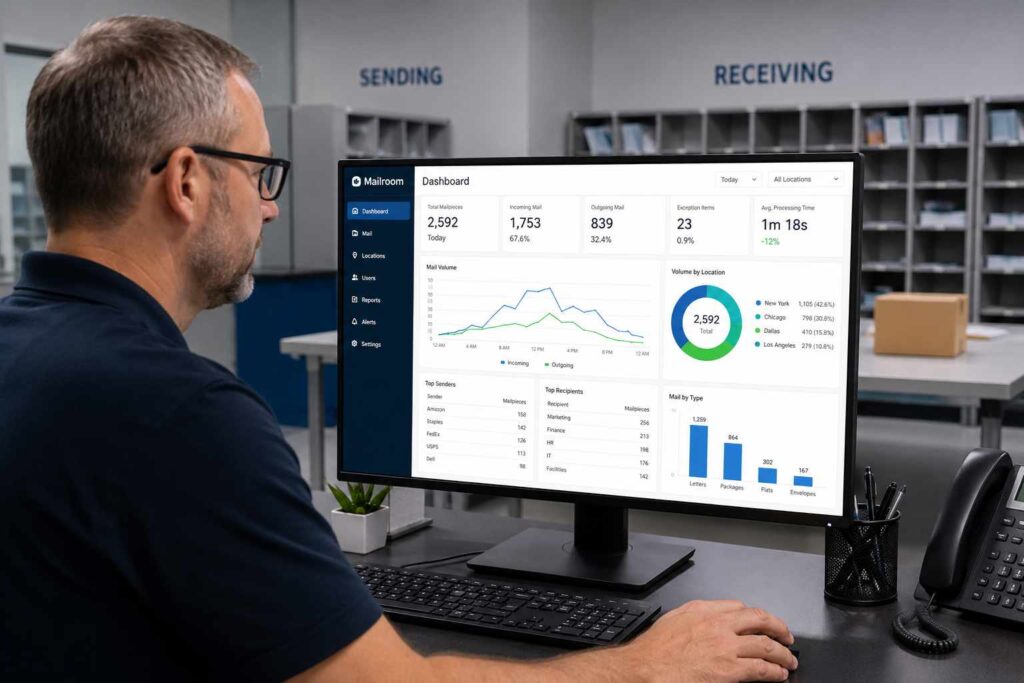
Raw numbers only become useful once they are visible in a form leadership can act on. This is where package tracking software dashboards matter as much as the underlying data collection: a dashboard that shows dwell time trending down after a staffing change, or exception rates dropping after a labeling policy update, gives a facilities manager a concrete before-and-after story instead of a vague impression that things have improved.
Facilities teams working from real-time dashboards and structured KPI data consistently make better resource allocation decisions than teams relying on reactive, anecdote-driven management, and mailroom operations are not exempt from that pattern. A dwell time chart that spikes every Monday morning, for example, is a specific, actionable finding that a logbook could never have surfaced on its own, and it points directly at a staffing or scheduling fix rather than a vague sense that Mondays feel busier.
Using Analytics to Justify Mailroom Investment
Facilities managers are regularly asked to justify budget, whether that is for additional mailroom staff, new equipment, or software itself. Analytics change that conversation from an opinion to a case built on data. Showing that average dwell time has grown by a specific number of hours over two years alongside a documented increase in package volume is a far stronger argument for adding headcount than saying the mailroom "feels busier than it used to."
The same applies in the other direction. If a facilities team wants to demonstrate that an existing package tracking system is delivering value, showing a measurable drop in dwell time, exception rate, or missed-pickup complaints after implementation gives a concrete return on investment story that a budget committee can evaluate on its own terms, rather than taking the improvement on faith. That kind of documented before-and-after comparison is also exactly what a return on investment analysis for mailroom technology depends on.
Reporting Metrics That Matter to Different Audiences
Not every stakeholder needs the same numbers. Property or facilities directors typically care most about dwell time and exception rates, since those numbers speak directly to service quality and operational risk. Finance and budget committees respond better to volume trends and cost-per-package figures that connect mailroom performance to spending decisions. Tenants or building occupants, when they see reporting at all, generally care about a single number: how quickly they were notified after their package arrived.
Structuring reports around what each audience actually needs, rather than sending the same raw dashboard to everyone, is what makes analytics land as genuinely useful information instead of a wall of numbers nobody reads. A one-page monthly summary for leadership, paired with full dashboard access for the facilities team itself, tends to serve both groups better than one format trying to do everything.
Who Should Own Mailroom Analytics
In most buildings, ownership of these reports naturally sits with whoever manages the mailroom day to day, whether that is a facilities manager directly or a mailroom supervisor reporting up to one. What matters more than the specific title is that one person is responsible for reviewing the numbers on a set schedule, monthly at minimum, rather than analytics existing as a feature nobody actually opens. A dashboard that generates data but that no one reviews provides the same value as no dashboard at all.
Larger organizations with multiple buildings or a campus-style receiving operation often benefit from comparing metrics across locations, since a dwell time or exception rate that looks normal in isolation can reveal a real problem once it is measured against a similar building down the street with meaningfully better numbers.
Common Mistakes When Reading Mailroom Data
A few habits undermine otherwise good analytics work. The first is looking at a single day or week in isolation. Package volume naturally spikes around holidays, semester starts on a campus, or seasonal peaks in a retail-adjacent building, and comparing one unusually busy week to a typical week produces a misleading trend line. Comparing the same week year over year, or looking at a rolling monthly average, gives a far more honest picture.
Ignoring exception context. A rising exception rate is not automatically a staffing problem. It can just as easily point to a specific carrier whose labels are frequently unreadable, or a batch of packages addressed to a department that recently changed names. Reading the exception log itself, not just the percentage, is what turns a number into an actionable fix.
Treating every metric as equally important. Not every number needs a target or a monthly review. Dwell time and exception rate tend to matter for nearly every facility, while something like carrier-specific volume breakdowns is more useful occasionally, when planning a change to receiving hours or negotiating with a carrier, than as a recurring report.
Getting Started Without Overhauling Everything at Once
Facilities managers do not need to implement every possible metric on day one. Starting with two or three core numbers, such as average dwell time and exception rate, and reporting on them consistently for a full quarter builds a real baseline. From there, additional metrics like department-level volume breakdowns or carrier-specific performance can be layered in once the basics are established and staff are comfortable with the reporting rhythm.
The goal is not to produce the most complex dashboard possible. It is to have defensible, consistent numbers ready the next time someone asks how the mailroom is actually performing, rather than needing weeks to reconstruct an answer from paper records after the question has already been asked.
If your team is ready to see what this looks like with your own package volume, a demo is the fastest way to walk through the dashboards firsthand.
