
How Package Tracking Software Keeps Multi-Client Receiving Organized for Freight Forwarders and 3PLs
Freight forwarders and third-party logistics providers face a receiving challenge that most other organizations never deal with: every package that arrives belongs to a different client, and each of those clients expects to know the moment their shipment is in the building. Package tracking software solves this by scanning each parcel in seconds, automatically matching it to the right client and contact, and sending a notification the instant it is logged, replacing the clipboard, shared spreadsheet, or generic email inbox that most receiving docks still run on.
The Multi-Client Receiving Problem 3PLs and Freight Forwarders Face
The United States third-party logistics market is worth an estimated 227.69 billion dollars in 2026 and is projected to grow to 272.74 billion dollars by 2031, a 3.68 percent compound annual growth rate. That growth means more volume moving through the same receiving docks, often for dozens or hundreds of distinct client accounts at once, each with its own expectations about how quickly they are notified and what proof of receipt looks like.
A typical corporate mailroom or university receiving department is logging packages for one organization’s own people. A freight forwarder or 3PL is doing the same job multiplied across every client on its roster, and a mistake, a package logged to the wrong account, a notification sent to the wrong contact, a missing photo of a damaged pallet, does not just inconvenience one recipient. It creates a client-facing service failure that can affect a contract renewal, not just an internal annoyance that gets sorted out by the end of the day.
How This Is Different From a Standard Corporate or University Receiving Desk
It is worth being specific about why this vertical needs its own approach rather than reusing a generic receiving workflow. A corporate front desk or university mailroom is matching packages against a single, internal directory of employees or students. Everyone being notified works for, or attends, the same organization, and the receiving team answers to one set of internal expectations.
A freight forwarder or 3PL is matching packages against an entirely different structure: a roster of client companies, each with its own contacts, its own notification preferences, and its own contractual expectations about turnaround time and documentation. The receiving team is not just logging a delivery, it is acting as the first point of accountability in a relationship the company has with a paying client. That distinction is why software built for a single-organization mailroom often falls short here, even when it technically works, because it was never designed to segregate and report on data by client account in the first place.
Why Manual Logging Breaks Down at This Volume
Receiving dock research consistently points to the same root causes of errors: mismatched paperwork, mislabeled cartons, rushed unloading during peak windows, and a lack of standardized intake steps from one shift or one warehouse worker to the next. None of that is unique to freight forwarding, but the consequences compound faster when every inbound item has to be sorted into the correct client bucket rather than a single internal directory.
A paper log or a shared spreadsheet has no way to catch a mismatch at the point of intake. The error only surfaces later, when a client calls asking where their shipment is, and staff have to manually search paperwork or camera footage to reconstruct what happened. That reactive pattern is expensive in staff time and, more importantly, it erodes the client’s confidence in the operation. A single missed or misrouted shipment is rarely fatal to a client relationship on its own, but a pattern of them, each one requiring an apologetic phone call and a manual investigation, is exactly the kind of friction that shows up when a contract comes up for renewal.
What a 3PL-Ready Package Tracking System Needs to Do Differently
Package tracking software built for single-organization receiving is not automatically ready for a multi-client freight forwarding environment. A handful of capabilities separate a system that genuinely fits this vertical from one that was designed for a corporate front desk.
- Client-level segregation. Every scanned item needs to be tied to a specific client account, not just a person, so that reporting, notifications, and audit history can all be filtered and exported by client without manual sorting.
- Configurable notification rules per client. Some clients want a text the moment a pallet is scanned in; others only want a daily digest. A system built for this vertical lets each client’s notification preferences be set once and applied automatically, rather than forcing staff to remember who wants what.
- Photo and condition documentation at intake. Because damage or shortage disputes are common in freight handling, capturing a timestamped photo and condition note at the moment of receipt gives both the forwarder and the client a shared, tamper-proof record to point to instead of a he-said, she-said conversation weeks later.
- Offline capability at the dock. Loading docks and warehouse floors do not always have reliable connectivity. A system that can keep scanning and queue the data for sync once a connection returns avoids a full stop at the busiest, most error-prone moment of the day.
- Exportable, audit-ready history. Clients and their own auditors periodically want a full chain-of-custody record for a shipment. A searchable digital log that can be filtered and exported in minutes replaces what used to be a multi-hour paperwork search.
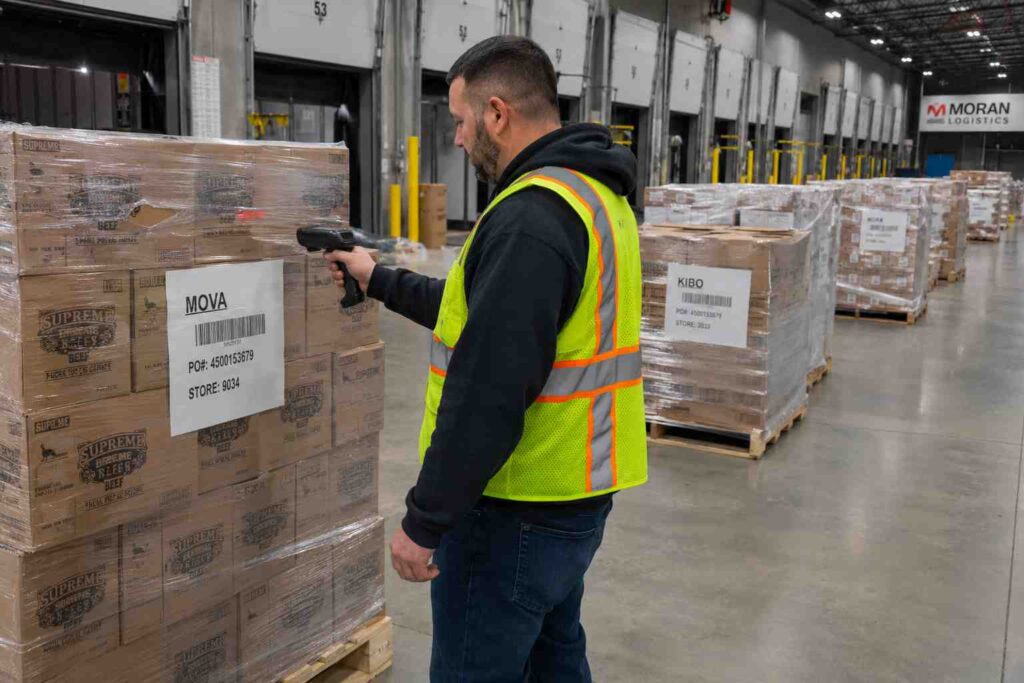
For example, imagine a regional freight forwarder handling inbound consolidation for forty retail clients. During a single Tuesday, three trucks arrive within an hour of each other, carrying a mix of pallets for a dozen different accounts. With a barcode scan at the dock and client-level routing built into the software, each pallet is logged to the correct account and its contact is notified within seconds, rather than staff manually sorting a stack of delivery receipts at the end of the shift and calling clients hours later. If a pallet arrives with a torn shrink wrap or a crushed corner, the photo captured at intake settles the condition question immediately, rather than becoming a dispute that takes a week of emails to resolve.
What to Look for When Evaluating Software for a 3PL or Forwarder Operation
Not every package tracking platform on the market was built with a multi-client operation in mind, so it is worth confirming a few things before committing to one. Ask whether the system supports true client-account segregation rather than just tagging packages with a free-text note. Ask how notification rules are configured, and whether they can be set per client rather than applied uniformly across the whole facility. Ask how photo and condition documentation is captured and stored, and whether that record can be handed to a client or auditor without extra manual work. Ask whether the platform can support multiple warehouse or dock locations under one account if the operation spans more than one facility, since consolidated reporting across sites matters as an operation grows.
TekCore’s inbound package tracking software was built around exactly this kind of high-volume, multi-account receiving environment, and the platform’s broader industry-specific benefits extend the same chain-of-custody approach used in corporate and healthcare receiving to logistics operations handling freight for many clients at once.
A Realistic Example
Consider a mid-sized freight forwarder that currently logs receipts on paper and emails clients manually once or twice a day. Staff spend an estimated twenty to thirty minutes per shift just reconciling which packages belong to which client before notifications can go out, and disputes over missing or damaged freight take days to resolve because there is no timestamped photo tied to the original scan. Multiply that twenty to thirty minutes across two or three shifts a day, and it adds up to real labor cost before a single client-facing benefit is even counted.
Moving that same operation to package receiving software built for this use case turns that reconciliation step into something that happens automatically at the moment of the scan, and gives both the forwarder and its clients a shared record to settle disputes in minutes instead of days. The receiving team spends its time handling exceptions instead of routine sorting, and clients get the real-time visibility they are increasingly coming to expect from any vendor handling their freight.
Frequently Asked Questions
Is package tracking software different for freight forwarders than for a regular office mailroom? Yes. The core scanning and notification functions are similar, but a freight forwarding or 3PL operation needs client-account segregation, per-client notification rules, and consolidated multi-client reporting that a single-organization mailroom system typically does not need.
Does this replace a warehouse management system? No. Package tracking software handles the receiving, notification, and chain-of-custody side of an inbound shipment. It is commonly used alongside, not instead of, a broader warehouse or transportation management system.
How long does it take to get a multi-client receiving operation set up on a new system? Implementation timelines vary by the number of client accounts and integration needs, but most receiving teams are able to start scanning and logging shipments within days once client accounts and notification preferences are configured.
Getting Started
The math on this is straightforward for most freight forwarding and 3PL operations. Software cost is small compared to the staff hours spent manually sorting and reconciling client shipments, and it is even smaller compared to the cost of a single client relationship damaged by a missed or misrouted delivery. Operations evaluating a move away from paper or spreadsheet logging can get a custom quote built around the number of clients and daily volume they handle.
