
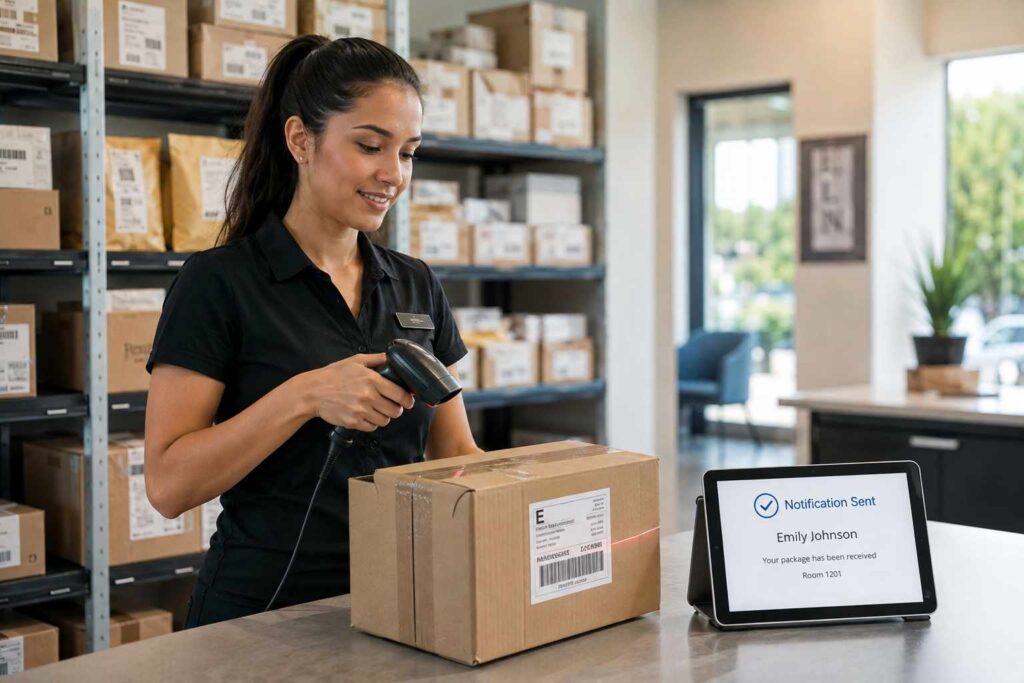
How Automated Package Notifications Cut Front Desk Interruptions and Save Mailroom Staff Time
Automated package notifications solve one of the most persistent drains on mailroom and front desk time: the constant stream of residents, tenants, or employees stopping by or calling to ask whether their package has arrived. When a scan at intake instantly triggers an email, text, or app alert to the recipient, staff stop fielding status questions and start spending that time on the parts of the job that actually require a person, and pickup happens faster because people know the moment their package is ready.
The Real Cost of “Has My Package Arrived Yet?” Interruptions
In any receiving operation that handles more than a handful of deliveries a day, a large share of staff time does not go toward the physical work of receiving packages. It goes toward answering the same question over and over: has this specific package come in yet. In a corporate mailroom, that means an employee walking down or calling the mailroom desk. In an apartment community, it means a resident stopping the leasing office team mid-task or calling to ask about a delivery that shows as “delivered” online but has not yet been sorted and shelved internally.
Each interruption is short on its own, often under a minute, but the cost is not really the minute itself. It is the context switch. A staff member who is in the middle of sorting, scanning, or logging a batch of packages has to stop, look up the resident or employee, check a shelf or a log, answer the question, and then re-orient back into the task they were doing. Multiplied across dozens of inquiries a day in a busy building, that adds up to a meaningful share of a shift spent reacting to questions instead of moving packages, and it is one of the main reasons manual, no-notification systems feel chronically behind even when the actual physical workload is manageable.
What an Automated Notification Workflow Actually Does
The mechanics are simple, which is part of why the impact is so outsized relative to the effort of setting it up. A staff member scans a package barcode or enters it manually at intake. The system matches that package to a resident or employee record already on file, and within seconds sends a notification through the recipient’s preferred channel, typically email, SMS text, or a mobile app push alert, letting them know a package is ready and where to collect it.
From there, most systems layer in a few additional pieces that matter more than they first appear to:
- Reminder escalation. If a package sits uncollected past a set number of days, the system sends a follow-up reminder automatically, instead of relying on staff to notice and re-notify manually.
- Pickup confirmation. Recipients confirm receipt with a signature, PIN code, or QR scan, which closes the loop and gives staff a timestamped record without a paper log.
- Channel preference. Recipients can typically choose text over email or vice versa, which matters because response speed varies a lot by channel and by the population being served, students and younger residents often respond faster to text than email, for example.
None of this requires a resident or employee to check a portal proactively or ask anyone anything. The notification comes to them the moment the package is scanned in, which is the entire point: it moves the burden of tracking status off of staff and off of a shared status page, and onto a system that pushes the information out automatically.

The Ripple Effect: Fewer Interruptions Also Means Fewer Theft and Misdelivery Problems
Faster notification does more than free up staff time. It shortens the amount of time a package sits around unclaimed, which is exactly the window where theft and misdelivery problems happen. This matters most in multifamily housing, where the risk profile is measurably different from a single-family home. Security.org’s research, cited in Porch Pirate Protection’s 2026 statistics roundup, found that apartment residents were victimized by package theft 3.5 times more often than homeowners in the most recent three-month period studied, a gap driven largely by the volume of people moving through shared entryways, communal mailrooms, and parking areas where a locked front door alone cannot fully control who has access.
Consider a mid-size apartment community that receives 80 to 120 packages a day during a normal week. Under a manual, no-notification process, packages accumulate in a back room or a wall of cubbies, and residents only learn a package arrived when they happen to check a shared tracking number themselves or stop by to ask. A package that sits unclaimed and unnotified for two or three days is a package sitting in a common area for two or three days, visible to anyone passing through, which is a meaningfully longer exposure window than a package that gets claimed within hours of an automatic text alert. Shrinking that window through faster notification does not eliminate theft risk on its own, but it removes one of the biggest contributing factors: packages nobody knows are waiting.
What to Look for in a Notification System
Not every notification setup delivers the same result, and a few practical details separate a system that genuinely reduces interruptions from one that just adds another inbox nobody checks.
- Multi-channel delivery. Email-only notification setups tend to have the slowest response times, since most people check text messages far more frequently than a secondary email inbox. A system that supports SMS and app push alongside email will generally produce faster pickup.
- Automatic escalation. Look for built-in reminder logic rather than a one-time notification, since a single alert that goes unread or gets buried still leaves a package sitting unclaimed.
- Integration with existing resident or employee directories. Manually re-entering contact information for every new resident or hire defeats much of the time savings; the notification system should pull from a property management system or HR directory that is already kept current.
- Clear audit trail. Every notification sent, and every confirmed pickup, should be timestamped and retrievable, both for resolving “I never got a notification” disputes and for demonstrating a documented chain of custody if a package goes missing.
Notification Needs Differ Between Corporate Offices and Multifamily Housing
The core mechanics of scan-then-notify stay the same across settings, but what “fast” and “convenient” mean shifts depending on who is receiving the alert. In a corporate office, employees are typically already checking email throughout the workday, so an email notification alone often performs reasonably well, especially when it is tied into a company directory so new hires and department transfers are picked up automatically. A corporate package tracking setup also tends to put more weight on routing packages to the right department or floor, since a single building may have hundreds of employees spread across multiple teams, rather than on urgency of pickup.
In multifamily housing, the calculus is different. Residents are not sitting at a desk checking email during business hours, and a package left unclaimed for days is both a security concern and a resident satisfaction issue that can show up in reviews or renewal decisions. Text and app notifications tend to outperform email-only setups here, and the reminder escalation feature matters more, since a resident who is traveling or simply forgets can otherwise leave a package sitting in a shared area for a week or longer. Property teams evaluating a system for this environment should weigh channel flexibility and escalation timing more heavily than they might for a corporate deployment.
A Realistic Example
Picture a 300-unit apartment community that switches from a manual sign-in sheet to package tracking software with automated text and email alerts. Before the change, the leasing office fields an estimated 25 to 35 walk-in or phone inquiries a day just about package status, on top of the actual work of receiving and sorting deliveries. After the change, each scanned package triggers an immediate text to the resident, and a follow-up reminder goes out automatically after 48 hours if it has not been picked up. Within the first few weeks, walk-in package inquiries drop sharply, since residents already know their package is ready before they would have thought to ask. Staff time that used to go toward answering the same question dozens of times a day shifts toward actually processing the growing volume of daily deliveries, and packages spend less time sitting unclaimed in the mailroom, which lowers both the visible clutter and the theft exposure window described above.
Getting Started
For a property or organization still relying on a manual sign-in sheet or a shared tracking spreadsheet, the fastest first step is usually not a full operational overhaul, it is simply turning on automatic notifications tied to the intake scan. Purpose-built package tracking notification workflows handle the multi-channel delivery, reminder escalation, and audit trail pieces described above without requiring a custom build, and they typically sit on top of the same intake scanning step a mailroom is already doing, which makes the transition far less disruptive than it sounds. For larger operations managing multiple buildings or departments, pairing notifications with a broader mailroom automation system extends the same time savings across intake, storage, and pickup confirmation in one workflow.
If your team is fielding a steady stream of “has my package arrived” questions every day, it is worth a closer look. You can schedule a demo to see how automated notifications would fit into your current intake process.
Frequently Asked Questions
Do automated package notifications require residents or employees to download an app? Not necessarily. Most systems support email and SMS text notifications without requiring an app install, and an app is typically offered as an additional option rather than a requirement, so adoption does not depend on getting everyone to install something new.
How quickly does a notification go out after a package is scanned? In most systems, the notification is sent within seconds of the scan being logged, since the alert is triggered directly by the intake action rather than by a separate batch process running later.
Does automated notification replace the need for staff to log packages at all? No. A staff member or a scanning kiosk still needs to log each package as it arrives; the automation applies to what happens immediately after that scan, not to the physical receiving step itself.
What happens if a resident or employee never responds to the notification? This is where automatic reminder escalation matters. A well-configured system will send a follow-up reminder after a set number of days, and packages that remain unclaimed past a longer threshold typically get flagged for staff to follow up on directly.
