
Why Businesses Lose Packages Without Tracking (and What It Actually Costs)
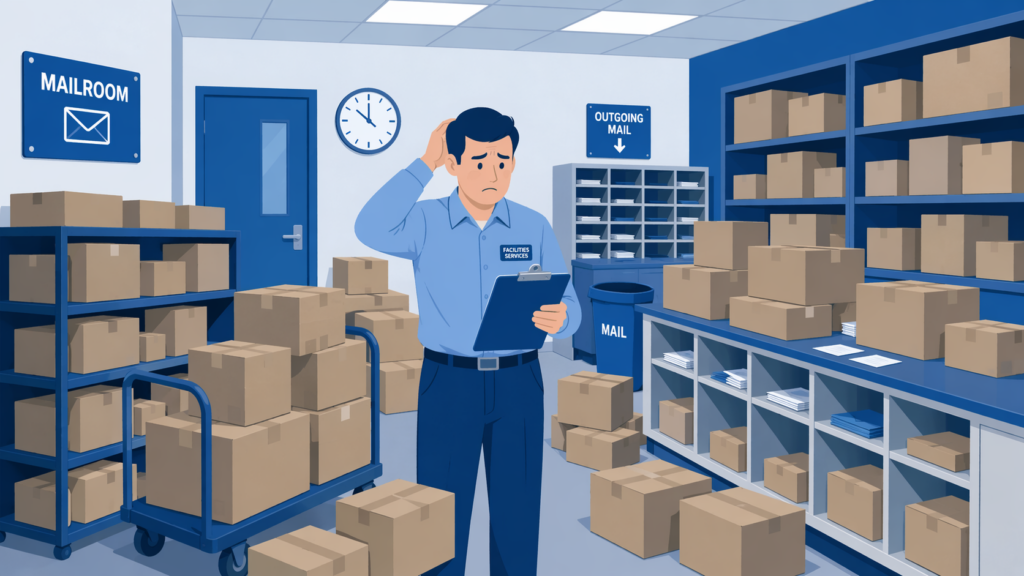
Businesses lose packages without tracking because there is no documented record of what arrived, where it was stored, or who picked it up. When a package enters a building and nobody logs it, that package exists in a gap where carrier responsibility has ended and internal accountability has not started. The result is predictable: items go missing, staff waste hours searching, recipients file complaints, and the organization absorbs costs that were entirely preventable. 37 million packages worth more than $8 billion are stolen in the United States each year, and a significant share of those losses happen not during transit but after delivery, inside the buildings where tracking stopped.
This article breaks down the specific reasons organizations lose packages when they lack a tracking system. If your facility still relies on paper logs, shared spreadsheets, or no logging at all, the patterns described here will sound familiar. More importantly, they are fixable.
The Gap Between Carrier Delivery and Recipient Pickup
Every major carrier (FedEx, UPS, USPS, Amazon, DHL) tracks a package from origin to delivery. The moment a driver scans that package as delivered to your building, their responsibility ends. Carrier insurance covers loss during transit, not after. Once the package crosses your threshold, your organization owns the risk.
For many businesses, this is where visibility goes dark. The carrier has a record. The recipient expects a package. But the building itself has no system connecting those two facts. Without inbound package tracking software, the gap between “delivered to building” and “picked up by recipient” is an unmonitored dead zone where packages disappear, sit unclaimed, or get handed to the wrong person with no record of what happened.
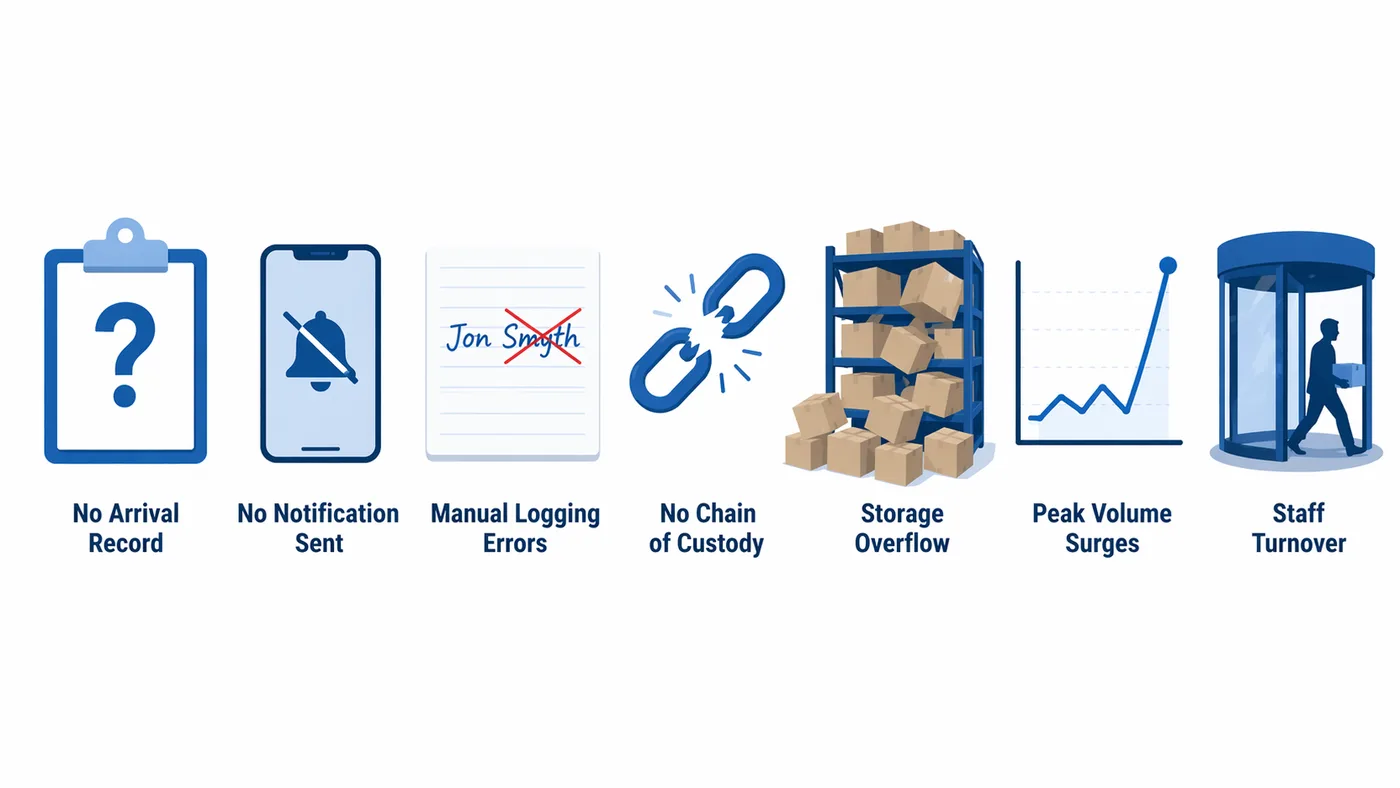
Seven Reasons Packages Go Missing Without a Tracking System
1. No Record That a Package Arrived
This is the most basic failure point. A carrier drops off 30 packages at a loading dock. A staff member signs for the batch. But nobody logs individual packages to individual recipients. When an employee calls the mailroom two days later asking about a shipment, the only response is “let me look around.” Without an arrival record tied to a specific tracking number, carrier, and recipient, there is no starting point for finding anything. Industry data shows that 1 to 2 percent of parcels are internally misplaced in organizations without tracking systems. For a facility handling 5,000 packages a year, that is 50 to 100 lost items annually, each one generating a time-consuming search and potential replacement cost.
2. Recipients Never Find Out Their Package Arrived
A package that sits in a storage room because nobody told the recipient it was there is functionally lost. Without automated notifications, mailroom staff have to manually email, call, or walk the building to let people know they have a delivery. In practice, that notification step gets skipped when things get busy. The package sits. Days pass. Other packages pile on top of it. A Pitney Bowes campus logistics survey found that average pickup times drop significantly when automated alerts are in place, because recipients act on a text or email within hours rather than discovering a package days later by accident. When notifications are not part of the process, unclaimed packages accumulate until the storage area overflows and staff start making judgment calls about what to keep and what to discard.
3. Manual Logging Creates Errors That Cascade
Organizations that do attempt to log packages by hand face a different problem: the log itself becomes unreliable. A staff member writes “J. Smith” when the recipient is “J. Smyth.” A tracking number gets transposed. A carrier abbreviation is illegible. When someone searches the log for a specific package, the entry does not match because of a single-character error. Manual logging takes three to five minutes per package when you account for writing the recipient name, tracking number, carrier, and timestamp. Multiply that across 100 daily deliveries, and a mailroom clerk spends five to eight hours a day on data entry alone, with an error rate that grows as fatigue sets in. A Statista study estimates that U.S. businesses lose $20 billion annually due to poor mail management, and data entry errors are a leading contributor.
4. No Chain of Custody Means No Accountability
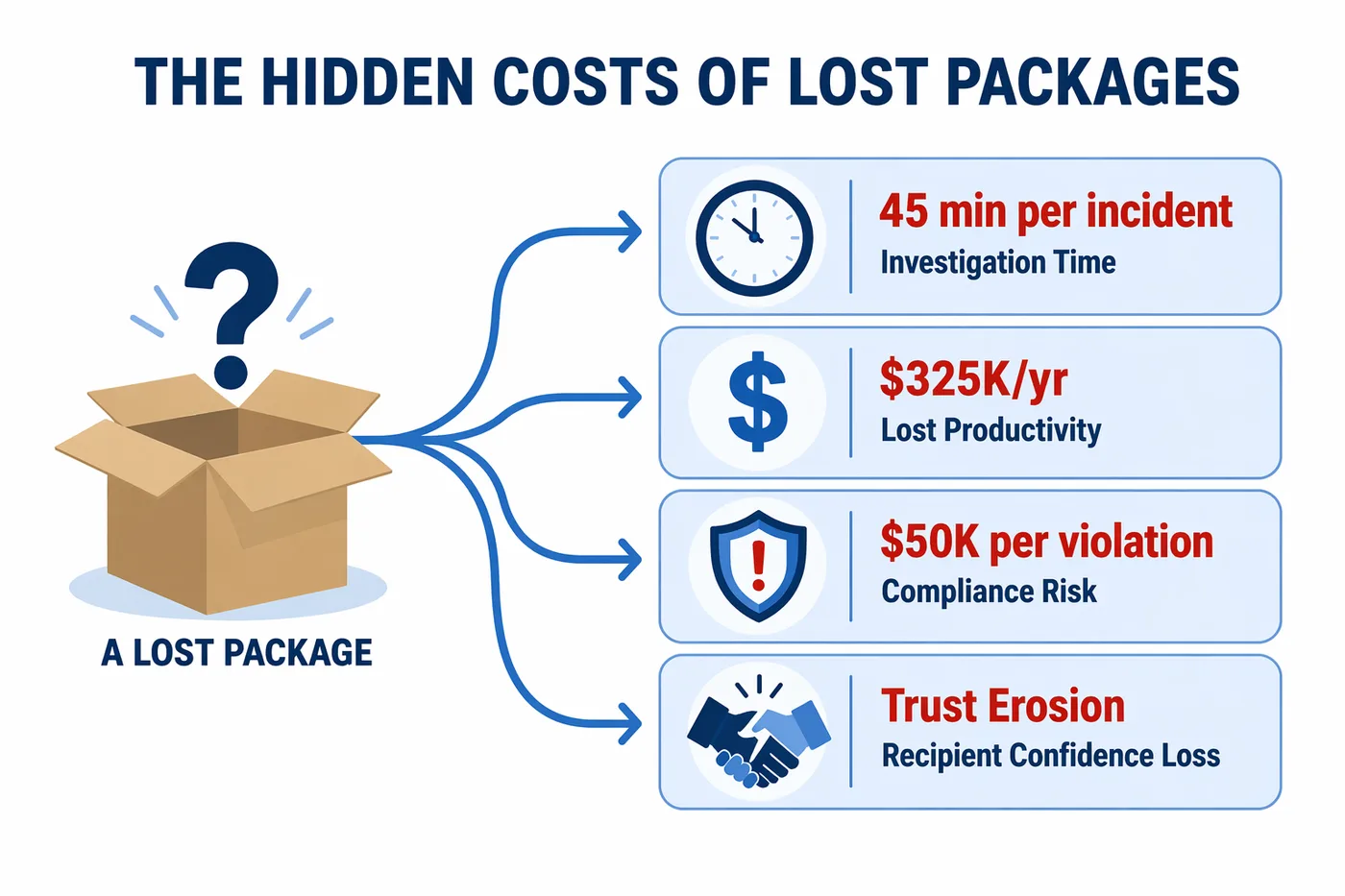
Without tracking, there is no way to answer the question “who had this package last?” A delivery driver hands a box to a receptionist. The receptionist sets it on a shelf. A colleague grabs it thinking it is theirs. The actual recipient never sees it. Nobody is at fault because nobody was recorded. In organizations that handle sensitive or regulated deliveries (hospitals with pharmaceutical shipments, law firms with legal documents, government offices with classified materials), this absence of chain of custody is not just an inconvenience; it is a compliance risk. Chain-of-custody documentation is a regulatory expectation in healthcare, where HIPAA penalties range from $100 to $50,000 per violation for mishandled protected health information that arrives by mail or parcel.
5. Storage Areas Overflow and Packages Get Buried
When packages arrive faster than they get picked up, storage areas fill. Shelves, counters, floor space, and hallways become holding zones. Without a system that tracks what is stored where and how long it has been waiting, older packages get pushed to the back and forgotten. We hear this constantly from facilities managers: a package arrives on Monday, gets buried behind Tuesday’s and Wednesday’s deliveries, and by Friday nobody remembers it exists. Universities experience this at extreme scale. The average campus resident receives 66 packages per year, Georgetown University processes nearly 3,000 packages daily, and university mailrooms that lack automated tracking routinely report shelves full of unclaimed parcels with no efficient way to match them to recipients.
6. Peak Volume Surges Overwhelm Manual Processes
Package volume is not constant. Black Friday through Cyber Monday, back-to-school season, fiscal year-end procurement, and holiday gift exchanges all create spikes that can double or triple a facility’s normal daily intake. Manual processes that barely work at normal volume collapse entirely during these surges. A Pitney Bowes campus survey found that 70 percent of universities report increased or significantly increased package deliveries compared to three to five years ago, yet 59 percent still funnel everything through a central mailroom with no additional staffing. When a mailroom designed for 50 daily packages suddenly receives 150, the paper log does not scale. Packages get set aside “to be logged later,” and later never comes.
7. Staff Turnover Erases Institutional Knowledge
In organizations without a tracking system, the mailroom’s “system” is often one person’s memory. They know which shelf is for which department, which carriers deliver at which times, and which recipients need special handling. When that person leaves, calls in sick, or goes on vacation, the knowledge leaves with them. The replacement has no documented process to follow, no searchable history to reference, and no way to find a package that was logged (or not logged) by someone else. This is why organizations with high turnover in mailroom or front desk roles experience disproportionate package loss. The process is not in a system; it is in a person.
What Package Loss Actually Costs
The direct cost of a lost package is the value of the item. But the total cost is significantly higher when you account for the operational ripple effects.
Replacing a lost item, investigating what happened, and managing the recipient relationship takes an average of 45 minutes of staff time per incident, in addition to the replacement cost. In an office with 500 employees where each person wastes just 15 minutes per week searching for packages or asking the mailroom about deliveries, that adds up to 125 hours of lost productivity weekly, or more than $325,000 annually at a loaded cost of $50 per hour. For hospitals, a lost pharmaceutical shipment can delay patient treatment. For universities, lost textbooks and equipment affect academic schedules. For corporate offices, a missing contract or prototype can stall a deal worth far more than the package itself.
Beyond direct costs, there is the trust erosion. When recipients learn they cannot rely on the mailroom, they start asking carriers to deliver to their home address instead. That solves their problem but scatters the organization’s incoming shipments across dozens of personal addresses, creating procurement tracking issues, tax complications for businesses shipping to home addresses, and a mailroom that appears underutilized despite the organization receiving more packages than ever.
How Package Tracking Software Closes the Gap
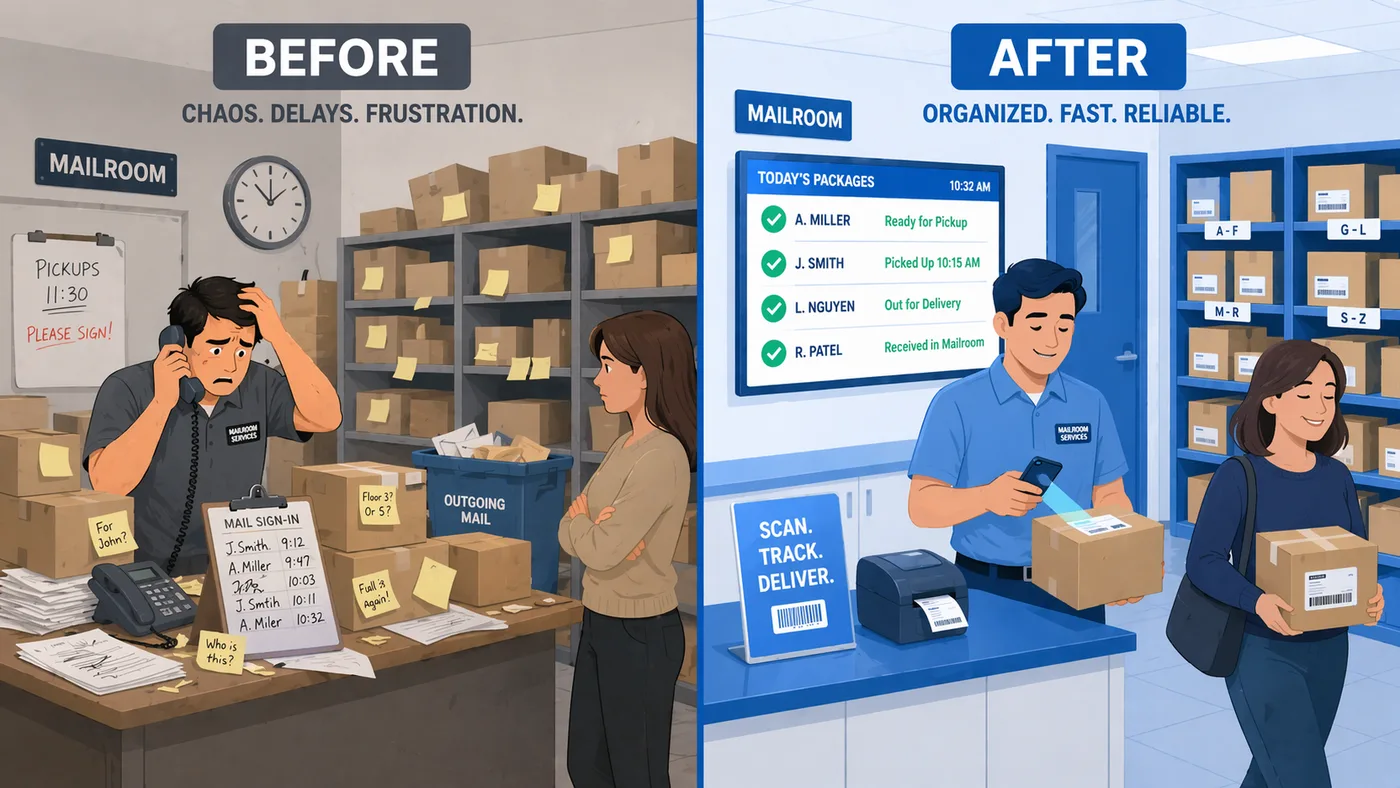
Package tracking software addresses every failure point described above by replacing manual, memory-dependent processes with a documented digital workflow.
- Arrival logging. Every package gets logged the moment it arrives, using a barcode scanner, smartphone camera, or manual tracking number entry. The system captures the carrier, tracking number, recipient, and timestamp automatically. What took three to five minutes per package by hand takes seconds.
- Automated notifications. The software sends an email, text message, or both to the recipient the instant their package is logged. Configurable reminders follow up on unclaimed items after a period you define. Recipients who know their package is waiting pick it up faster, which keeps storage areas clear.
- Digital chain of custody. Every touchpoint is recorded: who received the package from the carrier, where it was stored, who was notified, and who signed for it at pickup. If a recipient claims they never got a delivery, the system shows exactly what happened and when.
- Searchable records. Instead of flipping through a paper log, staff can search by recipient name, tracking number, carrier, date, or status. Finding a specific package takes seconds, not minutes.
- Scalable during surges. The same system that handles 50 packages on a slow Tuesday handles 200 on Black Friday without additional staff or process changes. The software does not get tired, skip entries, or make handwriting errors.
- Process independence from staff. Because the system holds the records, new staff can take over mailroom operations without losing visibility into existing packages. The process lives in the software, not in any one person’s memory.
Campuses using digital package tracking systems have reported a 30 percent reduction in lost or misplaced packages. Lancaster University saved 7,542 staff hours per year after switching from manual methods. Vita Student achieved 99 percent logging accuracy across their properties. These numbers reflect what happens when you replace guesswork with a system designed for the job.
TekTrack is built to close every gap described in this article: intake logging across all carriers, automatic recipient notifications, complete chain-of-custody records, and searchable history for every package. You can compare editions and features or schedule a demo to see how it works with your actual packages.
